🚚 Free Worldwide Shipping on All Orders!Shop Now

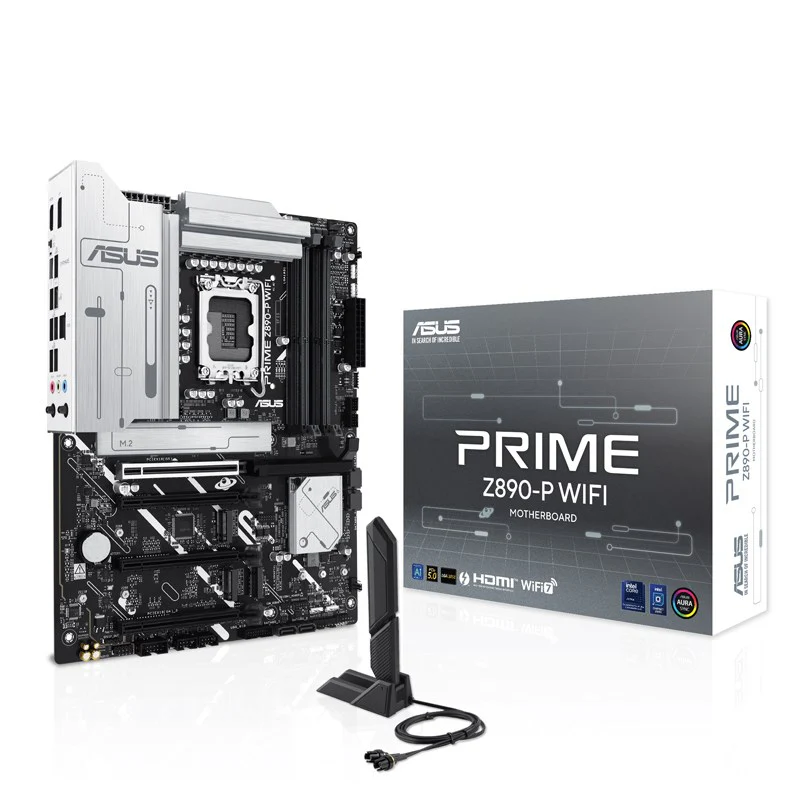

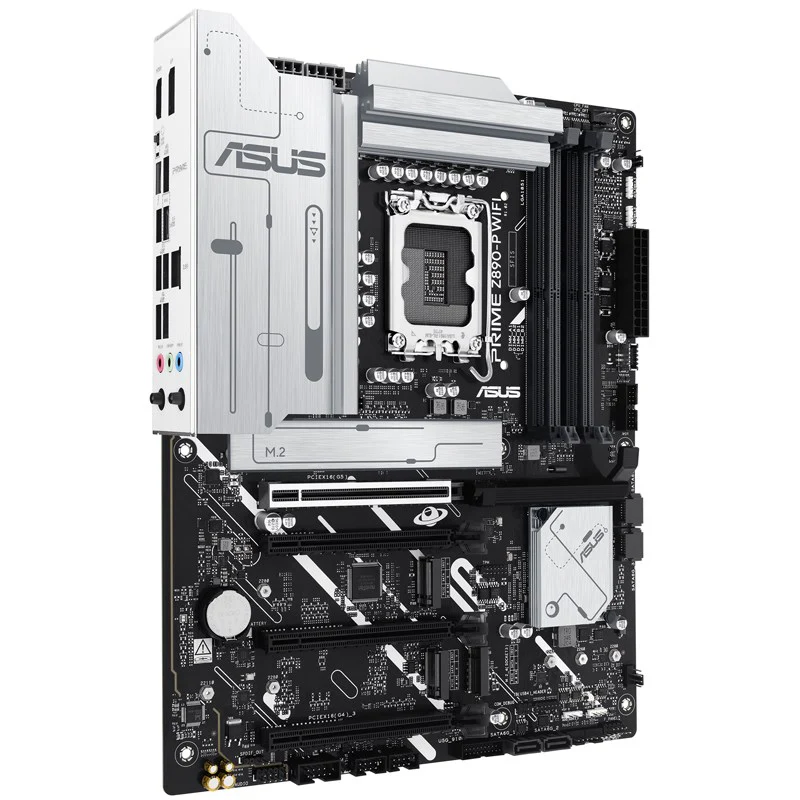
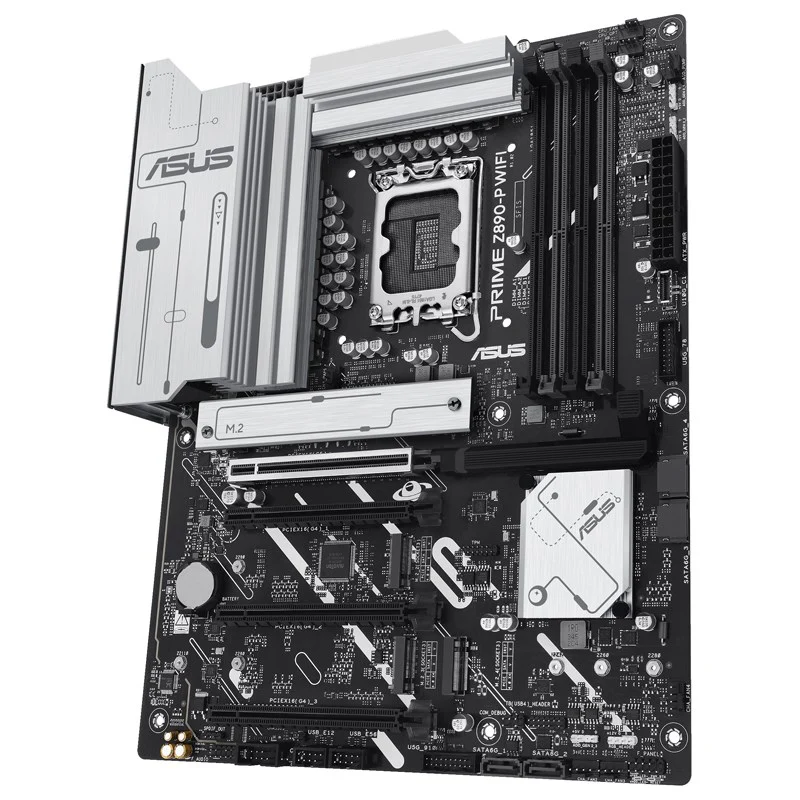
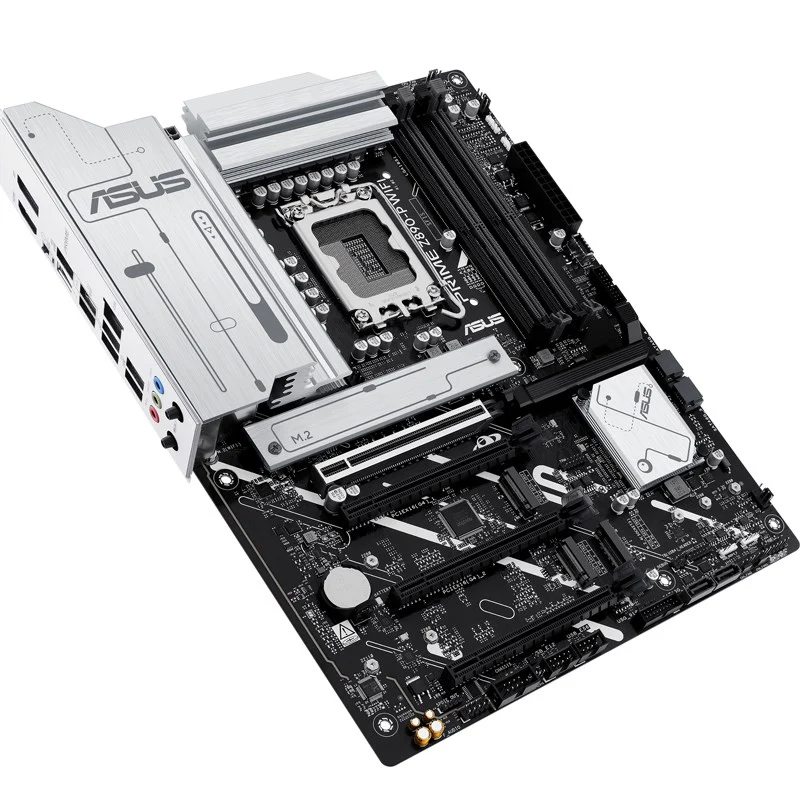
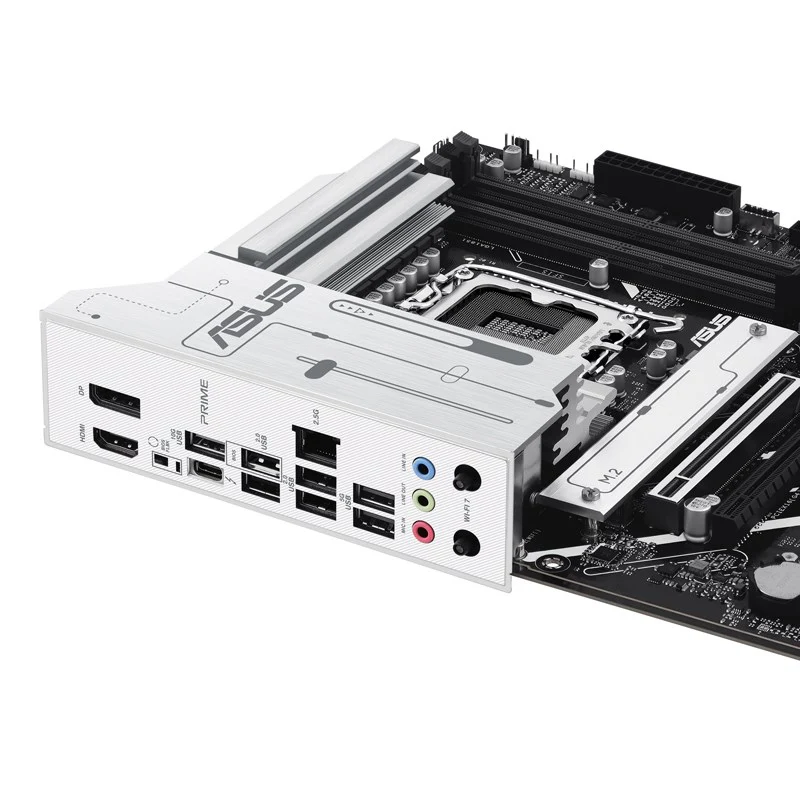
Asus PRIME Z890-P WIFI 7, DDR5 ATX Gaming Motherboard
PRIME Z890-P WIFI |
||||||||||||||||||||||||||||||||||||||||||||||||||||||||||||||||||||||||||||||||||||||||||||||||||||||||||||||||||||||||||||||||||||||||||||||||||||||||||||||||||||||||||||||||||||||||||||||||||||||||||||||||||||||||||||||||||||||||||||||||||||||||||||||||||||||||||||||||||||||||||||||||||||||||||||||||||||||||||||||||||
ASUS PRIME series motherboards are expertly engineered to unleash the full potential of the latest Intel® Core™ Ultra Processors (Series 2). Boasting a robust power design, comprehensive cooling solutions and intelligent tuning options, the PRIME Z890-P WIFI motherboard provides users and PC DIY builders with a range of performance optimizations via intuitive software and firmware features. It’s designed to be Advanced AI PC-ready, offering the power and connectivity needed for demanding AI applications.PerformanceAI SolutionsASUS AI Solutions include AI Advisor as your technical expert with expertise in PC performance, and AI Cooling II for automated temperature control.AI AdvisorASUS AI Advisor is an ASUS technical expert that's always available to answer your questions. Owners of compatible ASUS motherboards can interact with this AI-powered technology using natural language to learn more about their hardware. For DIY beginners, it can provide easy-to-understand explanations of one-click optimization features like AI Cooling II, and for seasoned PC-building veterans, it can offer guidance and instructions on the latest features offered by ASUS.AI Networking IIAI Networking II combines intelligent technologies to continuously optimize network performance, provide trustworthy and seamless connectivity and unleash the full speed of WiFi 7.AI Cooling IIAI Cooling II balances the thermals and acoustics of any build with a single click. An exclusive ASUS algorithm slashes unnecessary noise while running a quick stress test, and then it monitors CPU temperatures to dynamically adjust fans to optimal speeds.PerformanceNPU BoostThe integrated NPU in Intel® Core™ Ultra Processors (Series 2) efficiently accelerates AI workflows — and NPU Boost lets you do more with it. This BIOS feature overclocks the NPU with just one click, increasing performance by up to 24%.PerformanceRobust Power DesignStable power is crucial for maximizing the performance of Intel® Core™ Ultra Processors (Series 2). The PRIME Z890-P is designed to meet the needs of high-core-count CPUs. It features 14(80A) + 1(80A) + 2(80A) + 1(80A) power stages that integrate high-side and low-side MOSFETs and drivers into packages rated for up to 80 amperes each. This configuration ensures optimal power delivery, efficiency, stability and performance for both current and future Intel® processors.Six-layer PCB DesignEnhanced stability and overclocking.The multi-layered printed circuit board design quickly dissipates heat around the voltage regulators to improve overall system stability and provide the CPU with more overclocking headroom.ProCool ConnectorsProprietary 8 + 8 pin connectors improve PSU connection.Proprietary connectors augment the motherboard’s link to the power supply with 8 + 8 pin connectors that pass 12 volts of power directly to the processor. Each connector features solid pins that can handle more current than hollow-pin connectors.Power SavingOptimize power with CPU, lighting, and fan settings.The Power Saving function contains several settings to easily optimize power consumption and maximize energy savings. You can enable a CPU power limit, darken Aura lighting and set the fan profile to a Power Saving mode. You can also toggle the Power Saver plan that is built into Microsoft Windows.Digi+ VRM ControlThe Digi+ voltage-regulator module (VRM) delivers real-time control over voltage droop, automatically switching frequency and power-efficiency settings.Enhanced Memory & Storage PerformanceAEMP III for Ultimate DDR5 PerformanceASUS Enhanced Memory Profile III (AEMP III) is an advanced firmware feature that empowers users to achieve unparalleled memory performance with cutting-edge CUDIMM memory. Through a two-phase comprehensive tuning process, AEMP III first optimizes the clock driver and then the memory frequency. This results in the best balance between performance and stability, even at cutting-edge speeds of DDR5-7600 or higher.DIMM FitDIMM Fit is an ASUS-exclusive BIOS feature that precisely analyzes individual memory modules to optimize performance and pinpoint potential issues. This offers peak efficiency, compatibility, and system stability. Whether you are an overclocker seeking ultimate performance, a competitor pursuing the most responsive gameplay, or a content creator prioritizing rock-solid stability, DIMM Fit provides optimizations tailored to your needs and your hardware configuration.Four M.2 slots (up to 128Gbps)PRIME Z890-P offers a total of four M.2 slots, including one that supports data-transfer speeds of up to 128Gbps via PCIe 5.0, three that support 64Gbps via PCIe 4.0. This enables quicker boot-up and app load times with OS or application drives.CoolingCooler by DesignThe PRIME Z890-P WIFI motherboard is engineered with multiple onboard heatsinks and an array of hybrid fan headers to help ensure your rig stays cool and stable under intense workloads.AIO pump HeaderA dedicated PWM/DC header supports self-contained water-cooling setups.VRM Heatsinks and Thermal PadsThe massive VRM heatsinks and essential thermal pads improve heat transfer from the MOSFETs and chokes for better cooling performance.Multiple Temperature SourcesEach header can dynamically reference four thermal sensors. Fan Xpert 4 lets you to map the temperature of supported ASUS graphics cards to optimize cooling for GPU- and CPU-intensive tasks.4-Pin PWM/DC FanEach onboard header supports auto-detection of PWM or DC fans.M.2 HeatsinkOne M.2 heatsink takes care of the M.2 slot, preventing throttling that can occur with M.2 storage during extended transfers.Passive Chipset HeatsinkAn aluminum passive chipset heatsink ensures optimal cooling and stable performance. It is more durable and longer-lasting than heatsinks with fans, which can be vulnerable to the buildup of dust and debris.Smart ProtectionA dedicated integrated circuit protects each fan header from overheating and excess current.Smart Cooling PrecisionASUS Fan Xpert 4ASUS Fan Xpert 4 software offers comprehensive control over fans and AIO coolers. Auto-Tuning mode configures settings with one click, while Extreme Quiet mode reduces fan speeds for silent operation during light tasks. Controls are also available via the UEFI BIOS.Cooler CompatibilityASUS AIO coolers offer robust performance, high overclocking potential, bold aesthetics and customizable functionality for new motherboards, empowering you to build your dream gaming rig.FlexibilityEmpowering ConnectionsThe PRIME Z890-P WIFI motherboard offers a versatile range of connectivity, including support for WiFi 7, the latest version of PCI Express, while an arsenal of USB ports includes Type-C connections, and Thunderbolt™ 4 which expands compatibility and bandwidth even further.WiFi 7The next-gen WiFi 78 supports 160 MHz bandwidth in the 6 GHz band and 4096 QAM. Multi-Link Operation (MLO) ensures stable connections and low latency, supporting 2.4, 5, and 6 GHz bands for enhanced coverage and throughput.Thunderbolt 4 Type-C portsThunderbolt™ 4 Type-C® port delivers up to 40Gbps of bidirectional bandwidth for the latest super-speed devices and drives. The port can be employed for up to one external 8K display, and PCIe bandwidth extends to up to 32Gbps.PCIe 5.0 slotPCIe 5.0 slotThe latest processors introduce PCIe 5.0 support, doubling data transfer speeds compared to PCIe 4.0, enhancing signal integrity, and providing backward-compatible CEM connectors and support for previous PCIe versions.CustomizationPersonalizationThe PRIME Z890-P WIFI enhances the user experience across the board, from simplifying BIOS setting adjustments to offering customizable RGB lighting controls for a uniquely personal system aesthetic.UEFI BIOSThe renowned ASUS UEFI BIOS provides everything you need to configure, tweak and tune your system. It offers intelligently simplified options for PC DIY beginners, as well as comprehensive features for seasoned veterans.BIOS Q-DashboardSimplify your motherboard configuration with BIOS Q-Dashboard. Its intuitive visual representation of hardware connections and corresponding BIOS settings takes the complexity out of setting up your system. Upgrade now, and discover the power of BIOS Q-Dashboard to easily and efficiently enhance your computing setup.Advanced ModeAn intuitive Advanced mode offered via the UEFI lets you take complete control. A built-in search feature makes it easy to find options, and various advanced functions let you intelligently make nuanced adjustments so you can dial in performance just the way you want.ASUS MyHotkeyThis feature is flexible to customize BIOS hotkey for various use scenarios, users can set F3 and F4 optional functions, and then during the Power-On Self-Test (POST) you can more efficiently toggle ASUS EZ Flash or boot from a specified device.Search FunctionQuickly and easily find the option or setting you need.ASUS User ProfileEasily port configuration settings between different BIOS versions or share them with friends.EZ ModeEZ mode displays vital settings and stats and also offers guided wizards, drag-and-drop functionality and one-click application of important settings — all to help you get your rig up and running in no time.Intuitive Graphical Fan ControlFine-tune individual fan settings simply by dragging a curve with the mouse.Aura On/Off Mode (Stealth)Easily enable or disable Aura RGB lighting or every onboard LED, for a subdued aesthetic touch.TurboV CoreAccessed via ASUS DriverHub, TurboV Core delivers intuitive CPU tuning that can unleash performance for overclocking enthusiasts. No need to enter the BIOS — you can seamlessly modify settings directly from within Windows and apply them right away, without needing to reboot. TurboV Core is engineered to elevate system capabilities, with unprecedented simplicity.ASUS GlideXASUS GlideX is a cross-device, cross-platform screen-sharing, screen-control and operation solution for enhanced productivity across PCs, tablets, and smartphones via wired or wireless connections. Features include screen mirroring, screen extension, unified control with one keyboard and mouse, easy file transfers, and using mobile cameras as PC webcams. It’s compatible with Windows, macOS, Android, and iOS.ASUS DriverHubASUS DriverHub streamlines the installation and management of ASUS drivers and utilities to keep your hardware up-to-date and performing optimally. This standalone application automatically detects current driver versions and presents available updates in a list view. By default, it supports ASUS motherboards, and users are invited to install ASUS DriverHub after OS installation. Additionally, ASUS DriverHub offers one-click installation and update checks, making it easier for users to keep their systems running smoothly and efficiently.Armoury CrateWithin a single intuitive interface, Armoury Crate offers easily customized Aura Sync RGB settings for every compatible device in your arsenal, plus controls for an ever-growing family of ASUS products, including keyboard and mouse preferences. Armoury Crate also integrates product registration and a news feed so that the ASUS community always has access to interesting updates.Aura SyncOutshine the competitionA well-tuned enthusiast system deserves a matching aesthetic. ASUS Aura offers full RGB lighting control with a variety of functional presets for the built-in RGB LEDs as well as strips and devices connected to the onboard RGB headers — and it can all be synced with an ever-growing portfolio of Aura-capable hardware.Addressable Gen2 RGB headersThree Addressable Gen2 headers detect LED counts on compatible RGB devices, automatically adjusting lighting effects accordingly.DIY FriendlyThe PRIME Z890-P motherboard features EZ PC DIY innovations that simplify and speed up the PC building process, making DIY easy and convenient.Q-AntennaWith Q-Antenna, attaching a WiFi antenna to your PC is now easy and fast. Instead of slowly rotating two fasteners until they finally lock in, they just snap into place. Less hassle, and more consistent performance.PCIe Slot Q-ReleaseA physical lever unlocks the first PCIe slot’s security latch with one tap, greatly simplifying the process of detaching a PCIe card from the motherboard when it’s time to upgrade to a new graphics card or other compatible device.M.2 Q-LatchThe innovative ASUS Q-Latch makes it easy to install or remove an M.2 SSD without the need for specific tools or screws. This design employs a simple locking mechanism to secure the drive and neatly detach it with one tap.Q-LED CoreThe Q-LED Core display produces color-coded lights during the Power-On Self-Test (POST) that can help you troubleshoot potential issues.Pre-mounted I/O ShieldOur pre-installed I/O shield safeguards ports, simplifies the build process, increases functionality and enhances aesthetics for PC DIY enthusiasts.BIOS FlashBackBIOS FlashBack™ simplifies BIOS updates. Just load the BIOS file onto a FAT32 USB stick, insert it into the BIOS FlashBack™ port, and press a button — no CPU or memory needed.SafeSlotPCIe 5.0 is twice as fast as PCIe 4.0. ASUS has adapted our SMT manufacturing for the faster SafeSlot, a reinforced metal sheath that ensures secure card installation and faster data speeds. |
||||||||||||||||||||||||||||||||||||||||||||||||||||||||||||||||||||||||||||||||||||||||||||||||||||||||||||||||||||||||||||||||||||||||||||||||||||||||||||||||||||||||||||||||||||||||||||||||||||||||||||||||||||||||||||||||||||||||||||||||||||||||||||||||||||||||||||||||||||||||||||||||||||||||||||||||||||||||||||||||||
Specifications:
|
$287.61
Asus PRIME Z890-P WIFI 7, DDR5 ATX Gaming Motherboard—
$287.61
Product Information
Product Information
Shipping & Returns
Shipping & Returns
Description
PRIME Z890-P WIFI |
||||||||||||||||||||||||||||||||||||||||||||||||||||||||||||||||||||||||||||||||||||||||||||||||||||||||||||||||||||||||||||||||||||||||||||||||||||||||||||||||||||||||||||||||||||||||||||||||||||||||||||||||||||||||||||||||||||||||||||||||||||||||||||||||||||||||||||||||||||||||||||||||||||||||||||||||||||||||||||||||||
ASUS PRIME series motherboards are expertly engineered to unleash the full potential of the latest Intel® Core™ Ultra Processors (Series 2). Boasting a robust power design, comprehensive cooling solutions and intelligent tuning options, the PRIME Z890-P WIFI motherboard provides users and PC DIY builders with a range of performance optimizations via intuitive software and firmware features. It’s designed to be Advanced AI PC-ready, offering the power and connectivity needed for demanding AI applications.PerformanceAI SolutionsASUS AI Solutions include AI Advisor as your technical expert with expertise in PC performance, and AI Cooling II for automated temperature control.AI AdvisorASUS AI Advisor is an ASUS technical expert that's always available to answer your questions. Owners of compatible ASUS motherboards can interact with this AI-powered technology using natural language to learn more about their hardware. For DIY beginners, it can provide easy-to-understand explanations of one-click optimization features like AI Cooling II, and for seasoned PC-building veterans, it can offer guidance and instructions on the latest features offered by ASUS.AI Networking IIAI Networking II combines intelligent technologies to continuously optimize network performance, provide trustworthy and seamless connectivity and unleash the full speed of WiFi 7.AI Cooling IIAI Cooling II balances the thermals and acoustics of any build with a single click. An exclusive ASUS algorithm slashes unnecessary noise while running a quick stress test, and then it monitors CPU temperatures to dynamically adjust fans to optimal speeds.PerformanceNPU BoostThe integrated NPU in Intel® Core™ Ultra Processors (Series 2) efficiently accelerates AI workflows — and NPU Boost lets you do more with it. This BIOS feature overclocks the NPU with just one click, increasing performance by up to 24%.PerformanceRobust Power DesignStable power is crucial for maximizing the performance of Intel® Core™ Ultra Processors (Series 2). The PRIME Z890-P is designed to meet the needs of high-core-count CPUs. It features 14(80A) + 1(80A) + 2(80A) + 1(80A) power stages that integrate high-side and low-side MOSFETs and drivers into packages rated for up to 80 amperes each. This configuration ensures optimal power delivery, efficiency, stability and performance for both current and future Intel® processors.Six-layer PCB DesignEnhanced stability and overclocking.The multi-layered printed circuit board design quickly dissipates heat around the voltage regulators to improve overall system stability and provide the CPU with more overclocking headroom.ProCool ConnectorsProprietary 8 + 8 pin connectors improve PSU connection.Proprietary connectors augment the motherboard’s link to the power supply with 8 + 8 pin connectors that pass 12 volts of power directly to the processor. Each connector features solid pins that can handle more current than hollow-pin connectors.Power SavingOptimize power with CPU, lighting, and fan settings.The Power Saving function contains several settings to easily optimize power consumption and maximize energy savings. You can enable a CPU power limit, darken Aura lighting and set the fan profile to a Power Saving mode. You can also toggle the Power Saver plan that is built into Microsoft Windows.Digi+ VRM ControlThe Digi+ voltage-regulator module (VRM) delivers real-time control over voltage droop, automatically switching frequency and power-efficiency settings.Enhanced Memory & Storage PerformanceAEMP III for Ultimate DDR5 PerformanceASUS Enhanced Memory Profile III (AEMP III) is an advanced firmware feature that empowers users to achieve unparalleled memory performance with cutting-edge CUDIMM memory. Through a two-phase comprehensive tuning process, AEMP III first optimizes the clock driver and then the memory frequency. This results in the best balance between performance and stability, even at cutting-edge speeds of DDR5-7600 or higher.DIMM FitDIMM Fit is an ASUS-exclusive BIOS feature that precisely analyzes individual memory modules to optimize performance and pinpoint potential issues. This offers peak efficiency, compatibility, and system stability. Whether you are an overclocker seeking ultimate performance, a competitor pursuing the most responsive gameplay, or a content creator prioritizing rock-solid stability, DIMM Fit provides optimizations tailored to your needs and your hardware configuration.Four M.2 slots (up to 128Gbps)PRIME Z890-P offers a total of four M.2 slots, including one that supports data-transfer speeds of up to 128Gbps via PCIe 5.0, three that support 64Gbps via PCIe 4.0. This enables quicker boot-up and app load times with OS or application drives.CoolingCooler by DesignThe PRIME Z890-P WIFI motherboard is engineered with multiple onboard heatsinks and an array of hybrid fan headers to help ensure your rig stays cool and stable under intense workloads.AIO pump HeaderA dedicated PWM/DC header supports self-contained water-cooling setups.VRM Heatsinks and Thermal PadsThe massive VRM heatsinks and essential thermal pads improve heat transfer from the MOSFETs and chokes for better cooling performance.Multiple Temperature SourcesEach header can dynamically reference four thermal sensors. Fan Xpert 4 lets you to map the temperature of supported ASUS graphics cards to optimize cooling for GPU- and CPU-intensive tasks.4-Pin PWM/DC FanEach onboard header supports auto-detection of PWM or DC fans.M.2 HeatsinkOne M.2 heatsink takes care of the M.2 slot, preventing throttling that can occur with M.2 storage during extended transfers.Passive Chipset HeatsinkAn aluminum passive chipset heatsink ensures optimal cooling and stable performance. It is more durable and longer-lasting than heatsinks with fans, which can be vulnerable to the buildup of dust and debris.Smart ProtectionA dedicated integrated circuit protects each fan header from overheating and excess current.Smart Cooling PrecisionASUS Fan Xpert 4ASUS Fan Xpert 4 software offers comprehensive control over fans and AIO coolers. Auto-Tuning mode configures settings with one click, while Extreme Quiet mode reduces fan speeds for silent operation during light tasks. Controls are also available via the UEFI BIOS.Cooler CompatibilityASUS AIO coolers offer robust performance, high overclocking potential, bold aesthetics and customizable functionality for new motherboards, empowering you to build your dream gaming rig.FlexibilityEmpowering ConnectionsThe PRIME Z890-P WIFI motherboard offers a versatile range of connectivity, including support for WiFi 7, the latest version of PCI Express, while an arsenal of USB ports includes Type-C connections, and Thunderbolt™ 4 which expands compatibility and bandwidth even further.WiFi 7The next-gen WiFi 78 supports 160 MHz bandwidth in the 6 GHz band and 4096 QAM. Multi-Link Operation (MLO) ensures stable connections and low latency, supporting 2.4, 5, and 6 GHz bands for enhanced coverage and throughput.Thunderbolt 4 Type-C portsThunderbolt™ 4 Type-C® port delivers up to 40Gbps of bidirectional bandwidth for the latest super-speed devices and drives. The port can be employed for up to one external 8K display, and PCIe bandwidth extends to up to 32Gbps.PCIe 5.0 slotPCIe 5.0 slotThe latest processors introduce PCIe 5.0 support, doubling data transfer speeds compared to PCIe 4.0, enhancing signal integrity, and providing backward-compatible CEM connectors and support for previous PCIe versions.CustomizationPersonalizationThe PRIME Z890-P WIFI enhances the user experience across the board, from simplifying BIOS setting adjustments to offering customizable RGB lighting controls for a uniquely personal system aesthetic.UEFI BIOSThe renowned ASUS UEFI BIOS provides everything you need to configure, tweak and tune your system. It offers intelligently simplified options for PC DIY beginners, as well as comprehensive features for seasoned veterans.BIOS Q-DashboardSimplify your motherboard configuration with BIOS Q-Dashboard. Its intuitive visual representation of hardware connections and corresponding BIOS settings takes the complexity out of setting up your system. Upgrade now, and discover the power of BIOS Q-Dashboard to easily and efficiently enhance your computing setup.Advanced ModeAn intuitive Advanced mode offered via the UEFI lets you take complete control. A built-in search feature makes it easy to find options, and various advanced functions let you intelligently make nuanced adjustments so you can dial in performance just the way you want.ASUS MyHotkeyThis feature is flexible to customize BIOS hotkey for various use scenarios, users can set F3 and F4 optional functions, and then during the Power-On Self-Test (POST) you can more efficiently toggle ASUS EZ Flash or boot from a specified device.Search FunctionQuickly and easily find the option or setting you need.ASUS User ProfileEasily port configuration settings between different BIOS versions or share them with friends.EZ ModeEZ mode displays vital settings and stats and also offers guided wizards, drag-and-drop functionality and one-click application of important settings — all to help you get your rig up and running in no time.Intuitive Graphical Fan ControlFine-tune individual fan settings simply by dragging a curve with the mouse.Aura On/Off Mode (Stealth)Easily enable or disable Aura RGB lighting or every onboard LED, for a subdued aesthetic touch.TurboV CoreAccessed via ASUS DriverHub, TurboV Core delivers intuitive CPU tuning that can unleash performance for overclocking enthusiasts. No need to enter the BIOS — you can seamlessly modify settings directly from within Windows and apply them right away, without needing to reboot. TurboV Core is engineered to elevate system capabilities, with unprecedented simplicity.ASUS GlideXASUS GlideX is a cross-device, cross-platform screen-sharing, screen-control and operation solution for enhanced productivity across PCs, tablets, and smartphones via wired or wireless connections. Features include screen mirroring, screen extension, unified control with one keyboard and mouse, easy file transfers, and using mobile cameras as PC webcams. It’s compatible with Windows, macOS, Android, and iOS.ASUS DriverHubASUS DriverHub streamlines the installation and management of ASUS drivers and utilities to keep your hardware up-to-date and performing optimally. This standalone application automatically detects current driver versions and presents available updates in a list view. By default, it supports ASUS motherboards, and users are invited to install ASUS DriverHub after OS installation. Additionally, ASUS DriverHub offers one-click installation and update checks, making it easier for users to keep their systems running smoothly and efficiently.Armoury CrateWithin a single intuitive interface, Armoury Crate offers easily customized Aura Sync RGB settings for every compatible device in your arsenal, plus controls for an ever-growing family of ASUS products, including keyboard and mouse preferences. Armoury Crate also integrates product registration and a news feed so that the ASUS community always has access to interesting updates.Aura SyncOutshine the competitionA well-tuned enthusiast system deserves a matching aesthetic. ASUS Aura offers full RGB lighting control with a variety of functional presets for the built-in RGB LEDs as well as strips and devices connected to the onboard RGB headers — and it can all be synced with an ever-growing portfolio of Aura-capable hardware.Addressable Gen2 RGB headersThree Addressable Gen2 headers detect LED counts on compatible RGB devices, automatically adjusting lighting effects accordingly.DIY FriendlyThe PRIME Z890-P motherboard features EZ PC DIY innovations that simplify and speed up the PC building process, making DIY easy and convenient.Q-AntennaWith Q-Antenna, attaching a WiFi antenna to your PC is now easy and fast. Instead of slowly rotating two fasteners until they finally lock in, they just snap into place. Less hassle, and more consistent performance.PCIe Slot Q-ReleaseA physical lever unlocks the first PCIe slot’s security latch with one tap, greatly simplifying the process of detaching a PCIe card from the motherboard when it’s time to upgrade to a new graphics card or other compatible device.M.2 Q-LatchThe innovative ASUS Q-Latch makes it easy to install or remove an M.2 SSD without the need for specific tools or screws. This design employs a simple locking mechanism to secure the drive and neatly detach it with one tap.Q-LED CoreThe Q-LED Core display produces color-coded lights during the Power-On Self-Test (POST) that can help you troubleshoot potential issues.Pre-mounted I/O ShieldOur pre-installed I/O shield safeguards ports, simplifies the build process, increases functionality and enhances aesthetics for PC DIY enthusiasts.BIOS FlashBackBIOS FlashBack™ simplifies BIOS updates. Just load the BIOS file onto a FAT32 USB stick, insert it into the BIOS FlashBack™ port, and press a button — no CPU or memory needed.SafeSlotPCIe 5.0 is twice as fast as PCIe 4.0. ASUS has adapted our SMT manufacturing for the faster SafeSlot, a reinforced metal sheath that ensures secure card installation and faster data speeds. |
||||||||||||||||||||||||||||||||||||||||||||||||||||||||||||||||||||||||||||||||||||||||||||||||||||||||||||||||||||||||||||||||||||||||||||||||||||||||||||||||||||||||||||||||||||||||||||||||||||||||||||||||||||||||||||||||||||||||||||||||||||||||||||||||||||||||||||||||||||||||||||||||||||||||||||||||||||||||||||||||||
Specifications:
|