🚚 Free Worldwide Shipping on All Orders!Shop Now

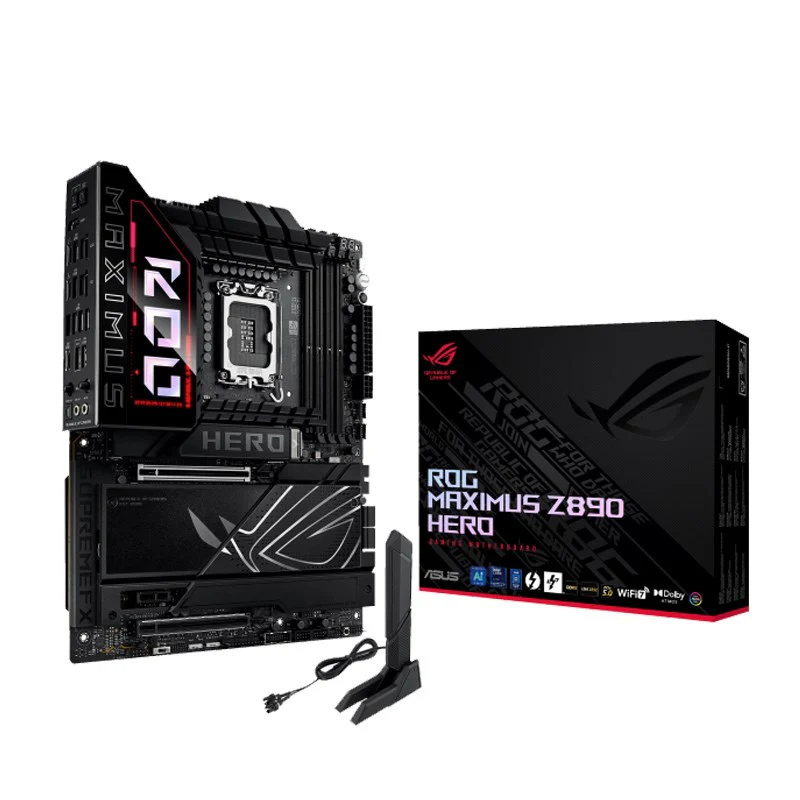
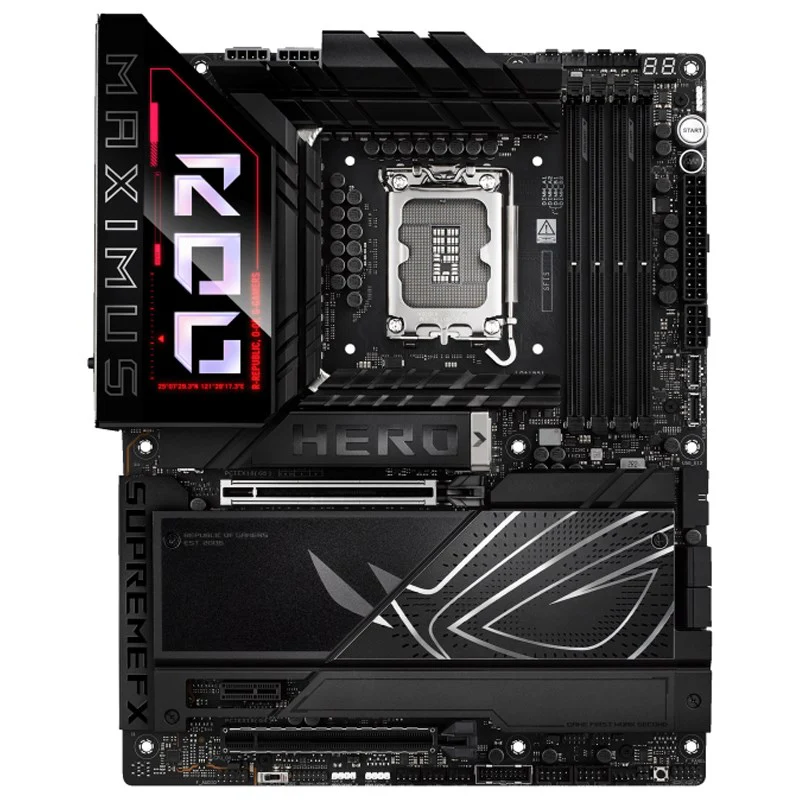


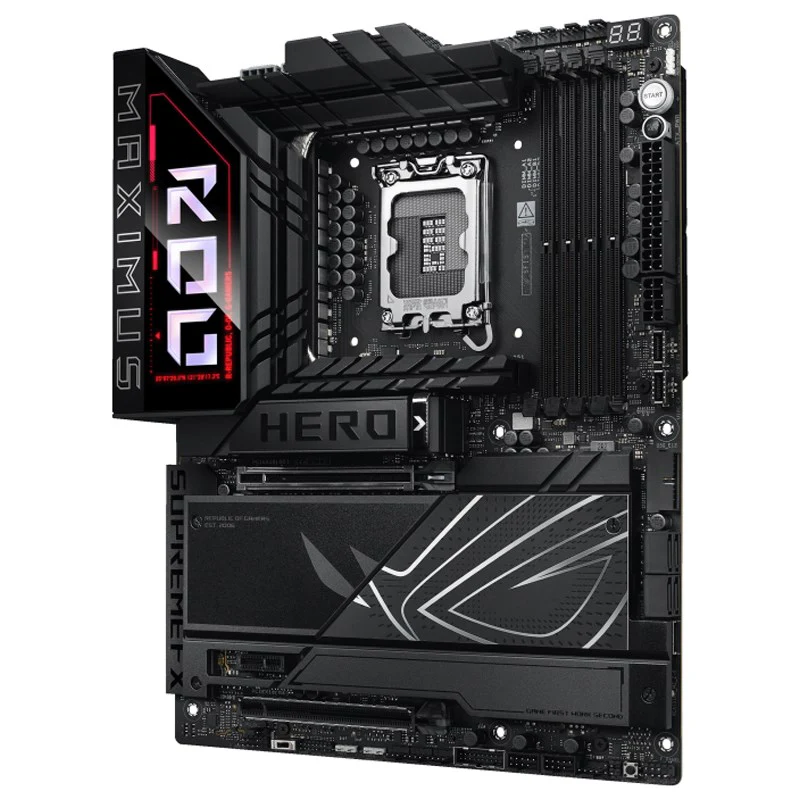
Asus ROG MAXIMUS Z890 HERO WIFI 7, DDR5 ATX Gaming Motherboard
ROG MAXIMUS Z890 HERO | ||||||||||||||||||||||||||||||||||||||||||||||||||||||||||||||||||||||||||||||||||||||||||||||||||||||||||||||||||||||||||||||||||||||||||||||||||||||||||||||||||||||||||||||||||||||||||||||||||||||||||||||||||||||||||||||||||||||||||||||||||||||||||||||||||||||||||||||||||||||||||||||||||||||||||||||||||||||||||||||||||||||||||||||||||||||||||||||||||||||||||||||||||||||||||||||||||||||
Intel® Z890 LGA 1851 ATX motherboard, Advanced AI PC-ready, 22+1+2+2 power stages, NPU Boost, DDR5 slots with NitroPath DRAM Technology, DIMM Flex, AEMP III, WiFi 7 with ASUS WiFi Q-Antenna, three PCIe® 5.0 M.2 slots and three PCIe 4.0 M.2 slots onboard with ROG M.2 PowerBoost, SlimSAS connector, PCIe 5.0 x16 SafeSlot with PCIe Slot Q-Release Slim and full support for next-gen graphics cards, two Thunderbolt™ 4 ports, USB 20Gbps Type-C® front-panel connector with Quick Charge 4+ up to 60W and USB Wattage Watcher, ASUS AI Advisor, AI Overclocking, AI Cooling II, AI Networking II and Polymo Lighting IIThe ROG Maximus Z890 Hero unleashes the performance of Intel® Core™ Ultra processors (Series 2) via exclusive AI PC technologies, robust power delivery, optimized thermal management, extensive PCIe® 5.0 support, DDR5 slots and WiFi 7. Meanwhile, angular design elements and Polymo II Lighting accents around the ROG logo deliver a signature aesthetic that elevates system design.ASUS AI IntelligenceASUS AI AdvisorUsing AI technology to understand natural-language questions or scenario descriptions, ASUS AI Advisor allows users to explore the functionality and advanced features of ASUS motherboards in a simple and straightforward way.AI OverclockingASUS AI Overclocking profiles the CPU and cooling to predict the optimal configuration and push the system to its limits.AI Cooling IIBalance the thermals and acoustics of any build with a single click.AI Networking IIAI Networking II combines intelligent technologies to continuously optimize network performance, provide trustworthy and seamless connectivity, and unleash the full speed of WiFi 7*.PerformanceOverclockingNPU BoostThe integrated NPU in Intel Core™ Ultra Processors (Series 2) efficiently accelerates AI workflows — and NPU Boost lets you do more with it. This BIOS feature overclocks the NPU with just one click, increasing performance by up to 24%.Differential SensingConventional motherboards use single-ended sensing tapped from a location that isn't ideal, leading to a large disparity between the actual voltage fed to the CPU and the value reported to software. The ROG Maximus Z890 Hero features a differential-sensing circuit and delicate IC that simplify overclocking and tuning by allowing you to track voltages more accurately.MemoryDDR5 StrengthROG has a rich history of delivering top-tier memory performance, and DDR5 is no exception. Enhanced signal routing can push enthusiast-grade kits well beyond the 8 GT/s threshold on the Strix Z890-F, with even greater speeds on the horizon. For experienced users, the UEFI offers a wide range of options to fine-tune and push performance to its limits.NitroPath DRAM TechnologyNitroPath DRAM Technology provides enhanced DDR5 memory performance. Shorter gold finger pins and optimized signal pathways ensure faster data transfers between your DRAM and CPU, allowing for greater memory overclocking headroom and stability. These reinformed DRAM slots are also better prepared to withstand the wear and tear of the RAM installation process than traditional slot designs, perfect for enthusiasts who keep their system upgraded with the fastest kits available.DIMM FitDIMM Fit is an ASUS-exclusive BIOS feature that precisely analyzes individual memory modules to optimize performance and pinpoint potential issues. This offers peak efficiency, compatibility, and system stability.Whether you are an overclocker seeking ultimate performance, a competitor pursuing the most responsive gameplay, or a content creator prioritizing rock-solid stability, DIMM Fit provides optimizations tailored to your needs and your hardware configuration.AEMP IIIASUS Enhanced Memory Profile III (AEMP III) is an advanced firmware feature that empowers users to achieve unparalleled memory performance with cutting-edge CUDIMM memory. Through a two-phase comprehensive tuning process, AEMP III first optimizes the clock driver and then the memory frequency. This results in the best balance between performance and stability, even at cutting-edge speeds of DDR5-8000 or higher.*DIMM FlexDIMM Flex provides enthusiasts with a powerful new way to overclock their DDR5 memory modules. It employs specialized circuitry that can boost performance or address potential stability issues, depending on temperature readings. When temperatures are nominal, it can use the extra headroom to increase speeds and efficiency. And when temperatures increase, it can adjust memory behavior downward to maintain stability.Power Solution22+1+2+2 power stagesThe VRM features 22+1+2+2 power stages, each rated to handle up to 110 amps8 + 8-pin ProCool II power connectorsDual ProCool connectors ensure a snug and reliable connection to the EPS 12V power lines.10K Black Metallic CapacitorsInput and output filtering is provided by solid-polymer capacitors rated to last thousands of hours at high operating temperatures.MicroFine Alloy ChokesEach power stage is accompanied by a high-permeability alloy-core choke rated to handle 45 amps.CoolingVRM and Aluminum I/O HeatsinkA VRM heatsink on the MOSFETs and chokes is connected to the aluminum I/O cover via an embedded heatpipe to increase mass and surface area for dissipation.High-conductivity thermal padsEach thermal pad improves overall heat transfer from the system by bridging the heat generated by the power stages to the heatsink.M.2 Heatsinks and BackplatesLarge aluminum heatsinks provide extensive surface area to cool mounted M.2 drives, and four of six onboard M.2 slots have dedicated backplates for additional heat dissipation.Chipset HeatsinkA dedicated heatsink draws heat away from the chipset to maintain optimum operating temperature.Thermal ManagementAn extensive array of headers line the ROG Maximus Z890 Hero for precise cooling control and monitoring.Multiple Temperature SourcesEach header can be set to monitor and react to user-configurable thermal sensors for workload-based cooling, and all settings can be easily managed by Fan Xpert 4 or UEFI.4-Pin Fan HeadersIn addition to the pair of CPU fan headers, the ROG Maximus Z890 Hero features four chassis headers, and each supports auto-detection of PWM or DC fans.Aio Pump HeaderAn additional PWM/DC fan header offers dedicated control of self-contained water-cooling setups.Cooler CompatibilityASUS AIO coolers offer robust performance, high overclocking potential, bold aesthetics and customizable functionality for new Z890 motherboards, empowering you to build your dream gaming rig.Leading ConnectivityWIFI 7The revolutionary WiFi 7 is up to 4.8X times faster than standard WiFi 6*, thanks to tech like 320 MHz channels** on the 6GHz band and 4K QAM*. Multi-Link Operation (MLO) provides a more stable WiFi connection and lower latency, unlocking the realms of the unknown in gaming, streaming and industrial IoT.ASUS WiFi Q-AntennaDual transceivers support the 2.4, 5 and 6 GHz bands to enable faster throughput, with directional sensitivity to improve signal quality and cover greater distances.Disclaimer: The availability of WiFi 7 160 GHz and 320 GHz varies according to regional regulations.Wireless Signal Reception Improvement Versus previous-generation antennaIntel 2.5Gb EthernetOnboard Intel 2.5Gb Ethernet gives your wired connection a boost, with speeds that are 2.5 times faster than standard Ethernet connections for speedy file transfers, low-latency gaming, and high-res video streaming.5Gb EthernetLow-latency gaming, speedy file transfers, and high-resolution video streaming are among the many perks of onboard Realtek 5Gbps Ethernet.M.2 Slots with ROG M.2 PowerBoostSix Onboard M.2 SlotsThe ROG Maximus Z890 Hero features six onboard M.2 slots, three of which are PCIe 5.0-ready to offer blistering 16 GB/s speeds, while the others offer still-impressive 8 GB/s over PCIe 4.0 interfaces. It also features a SlimSAS connector, which supports PCIe 4.0 x4 mode or up to 4 SATA devices via a transfer cable. The cable is purchased separately.ROG M.2 PowerBoostROG M.2 PowerBoost is an exclusive ASUS motherboard feature that provides amperage exceeding industry standards, supporting all six onboard M.2 slots to operate simultaneously at optimal performance. This advanced power setup helps ensure stability and data integrity even under high loads, while also helping to ensure the rated lifespan of an M.2 SSD.PCIe 5.0 Expansion SlotThe primary x16 expansion slot offers PCIe 5.0 with incredible speeds up to 64 GB/s for compatible devices, fully supporting next-gen graphics cards. To bear the weight of massive graphics cards, it is also protected with a SafeSlot retention bracket which can be released easily, thanks to PCIe Slot Q-Release Slim.Two Thunderbolt 4 Type-C PortsEach port delivers up to 40 Gbps of bidirectional bandwidth for the latest super-speed devices and drives. Both ports can be employed for up to two external 4K displays, and PCIe bandwidth extends to up to 32 Gbps.One USB 20Gbps & One USB 10Gbps Type-C Front Panel ConnectorsThe USB 20Gbps front-panel connector features Quick Charge 4+ technology that can rapidly charge devices up to 60W.Dolby AtmosROG and Dolby have partnered to bring superior gaming audio quality to users. Dolby Atmos expands on traditional surround sound systems by adding height channels, which enables immersive three-dimensional audio to be perceived from above, below and around the listener.SupremeFXROG SupremeFX is a unique blend of hardware and software technologies that provide superior audio. The Strix Z890-F implementation features the ALC4080 codec for high-resolution playback up to 32-bit/384 kHz across all channels. Front-panel output is streamed through the integrated Savitech amplifier that can drive high-fidelity acoustics to a wide variety of speakers and headsets.BIOSUEFI BIOSThe renowned ROG UEFI (BIOS) provides everything you need to configure, tweak, and tune your rig. It offers intelligently simplified options for newcomers to PC DIY, as well as more comprehensive features for seasoned veterans.BIOS Q-DashboardSimplify your motherboard configuration with BIOS Q-Dashboard. Its intuitive visual representation of hardware connections and corresponding BIOS settings takes the complexity out of setting up your system. Upgrade now and discover the power of BlOS Q-Dashboard to easily and efficiently enhance your computing setup.Advanced ModeWhen you’re ready for a deeper dive, delve into the UEFI’s Advanced mode and take complete control. Advanced mode enables full control over every aspect of the motherboard, and a built-in search function helps you quickly find the setting you need.My FavoritesQuickly locate tuning options and add preferred tools to your favorites list.EZ FlashFlash the latest BIOS via the internet from within the BIOS.S.M.A.R.T.Check your storage device Self-Monitoring, Analysis, and Reporting Technology (S.M.A.R.T.) logs to gauge reliability or to identify potential failures.SoftwareTurboV CoreIntuitive overclocking within Windows. No BIOS interface, no reboots. Simple and swift performance tuning at your fingertips.ASUS GlideXASUS GlideX is a cross-device, cross-platform screen-sharing, screen-control and operation solution for enhanced productivity across PCs, tablets, and smartphones via USB or WiFi. Features include screen mirroring, screen extension, unified control with one keyboard and mouse, easy file transfers, and using mobile cameras as PC webcams. It's compatible with Windows, macOS, Android, and iOS.HWiNFOHWiNFO and ROG have collaborated on this comprehensive system information and diagnostic tool that provides detailed information about hardware components and real-time monitoring of system performance in ROG style. It supports a wide range of hardware devices, and it is regularly updated to include the latest technologies.ASUS Driver HubASUS DriverHub streamlines the installation and management of ASUS drivers and utilities to keep your hardware up-to-date and performing optimally. This standalone application automatically detects current driver versions and presents available updates in a list view. By default, it supports ASUS motherboards, and users are invited to install ASUS DriverHub after OS installation. Additionally, ASUS DriverHub offers one-click installation and update checks, making it easier for users to keep their systems running smoothly and efficiently.AIDA64 ExtremeThe ROG Strix Z890-F includes a sixty-day AIDA64 Extreme subscription, a tool that provides detailed information about hardware and software, as well as benchmarks to measure the performance of the entire system or individual components. AIDA64 Extreme includes a monitoring and diagnostics feature to detect and prevent hardware issues. All vital system sensors can be tracked in real time, allowing voltage readings, fan speeds, and temperature information to be displayed on the desktop or sent to dedicated displays or to the LCD panels of ROG AIO liquid coolers*.*Support available for ROG Ryujin II and later models.Armoury CrateArmoury Crate is a software utility designed to give you centralized control of supported gaming products, making it easy to tune the look and feel of your system. From a single intuitive interface, Armoury Crate helps you customize RGB lighting and effects for compatible devices and synchronize them with Aura Sync to create a unified lighting scheme across your system. In addition, Armoury Crate’s Fan Xpert4 tool provides comprehensive control over fans, water pumps, and all-in-one (AIO) coolers.Thunderbolt ShareSeamless Dual-PC Sharing with Thunderbolt ShareExperience a revolutionary way to interact with two PCs using Thunderbolt™ Share—the ultrafast connectivity solution that transforms your dual-PC setup. Seamlessly share screens, keyboards, mice, storage and files between two computers, with the unparalleled speed of Thunderbolt™ technology.PersonalizationGlow Your Gaming World with Aura SyncUp your game with complementary Aura Sync enhanced aesthetics, featuring preset lighting effects that can be easily synchronized across compatible ROG graphics cards, monitors, keyboards, and mice to give your setup a unified look. | ||||||||||||||||||||||||||||||||||||||||||||||||||||||||||||||||||||||||||||||||||||||||||||||||||||||||||||||||||||||||||||||||||||||||||||||||||||||||||||||||||||||||||||||||||||||||||||||||||||||||||||||||||||||||||||||||||||||||||||||||||||||||||||||||||||||||||||||||||||||||||||||||||||||||||||||||||||||||||||||||||||||||||||||||||||||||||||||||||||||||||||||||||||||||||||||||||||||
Specifications:
|
$278.44
Original: $795.53
-65%Asus ROG MAXIMUS Z890 HERO WIFI 7, DDR5 ATX Gaming Motherboard—
$795.53
$278.44Product Information
Product Information
Shipping & Returns
Shipping & Returns
Description
ROG MAXIMUS Z890 HERO | ||||||||||||||||||||||||||||||||||||||||||||||||||||||||||||||||||||||||||||||||||||||||||||||||||||||||||||||||||||||||||||||||||||||||||||||||||||||||||||||||||||||||||||||||||||||||||||||||||||||||||||||||||||||||||||||||||||||||||||||||||||||||||||||||||||||||||||||||||||||||||||||||||||||||||||||||||||||||||||||||||||||||||||||||||||||||||||||||||||||||||||||||||||||||||||||||||||||
Intel® Z890 LGA 1851 ATX motherboard, Advanced AI PC-ready, 22+1+2+2 power stages, NPU Boost, DDR5 slots with NitroPath DRAM Technology, DIMM Flex, AEMP III, WiFi 7 with ASUS WiFi Q-Antenna, three PCIe® 5.0 M.2 slots and three PCIe 4.0 M.2 slots onboard with ROG M.2 PowerBoost, SlimSAS connector, PCIe 5.0 x16 SafeSlot with PCIe Slot Q-Release Slim and full support for next-gen graphics cards, two Thunderbolt™ 4 ports, USB 20Gbps Type-C® front-panel connector with Quick Charge 4+ up to 60W and USB Wattage Watcher, ASUS AI Advisor, AI Overclocking, AI Cooling II, AI Networking II and Polymo Lighting IIThe ROG Maximus Z890 Hero unleashes the performance of Intel® Core™ Ultra processors (Series 2) via exclusive AI PC technologies, robust power delivery, optimized thermal management, extensive PCIe® 5.0 support, DDR5 slots and WiFi 7. Meanwhile, angular design elements and Polymo II Lighting accents around the ROG logo deliver a signature aesthetic that elevates system design.ASUS AI IntelligenceASUS AI AdvisorUsing AI technology to understand natural-language questions or scenario descriptions, ASUS AI Advisor allows users to explore the functionality and advanced features of ASUS motherboards in a simple and straightforward way.AI OverclockingASUS AI Overclocking profiles the CPU and cooling to predict the optimal configuration and push the system to its limits.AI Cooling IIBalance the thermals and acoustics of any build with a single click.AI Networking IIAI Networking II combines intelligent technologies to continuously optimize network performance, provide trustworthy and seamless connectivity, and unleash the full speed of WiFi 7*.PerformanceOverclockingNPU BoostThe integrated NPU in Intel Core™ Ultra Processors (Series 2) efficiently accelerates AI workflows — and NPU Boost lets you do more with it. This BIOS feature overclocks the NPU with just one click, increasing performance by up to 24%.Differential SensingConventional motherboards use single-ended sensing tapped from a location that isn't ideal, leading to a large disparity between the actual voltage fed to the CPU and the value reported to software. The ROG Maximus Z890 Hero features a differential-sensing circuit and delicate IC that simplify overclocking and tuning by allowing you to track voltages more accurately.MemoryDDR5 StrengthROG has a rich history of delivering top-tier memory performance, and DDR5 is no exception. Enhanced signal routing can push enthusiast-grade kits well beyond the 8 GT/s threshold on the Strix Z890-F, with even greater speeds on the horizon. For experienced users, the UEFI offers a wide range of options to fine-tune and push performance to its limits.NitroPath DRAM TechnologyNitroPath DRAM Technology provides enhanced DDR5 memory performance. Shorter gold finger pins and optimized signal pathways ensure faster data transfers between your DRAM and CPU, allowing for greater memory overclocking headroom and stability. These reinformed DRAM slots are also better prepared to withstand the wear and tear of the RAM installation process than traditional slot designs, perfect for enthusiasts who keep their system upgraded with the fastest kits available.DIMM FitDIMM Fit is an ASUS-exclusive BIOS feature that precisely analyzes individual memory modules to optimize performance and pinpoint potential issues. This offers peak efficiency, compatibility, and system stability.Whether you are an overclocker seeking ultimate performance, a competitor pursuing the most responsive gameplay, or a content creator prioritizing rock-solid stability, DIMM Fit provides optimizations tailored to your needs and your hardware configuration.AEMP IIIASUS Enhanced Memory Profile III (AEMP III) is an advanced firmware feature that empowers users to achieve unparalleled memory performance with cutting-edge CUDIMM memory. Through a two-phase comprehensive tuning process, AEMP III first optimizes the clock driver and then the memory frequency. This results in the best balance between performance and stability, even at cutting-edge speeds of DDR5-8000 or higher.*DIMM FlexDIMM Flex provides enthusiasts with a powerful new way to overclock their DDR5 memory modules. It employs specialized circuitry that can boost performance or address potential stability issues, depending on temperature readings. When temperatures are nominal, it can use the extra headroom to increase speeds and efficiency. And when temperatures increase, it can adjust memory behavior downward to maintain stability.Power Solution22+1+2+2 power stagesThe VRM features 22+1+2+2 power stages, each rated to handle up to 110 amps8 + 8-pin ProCool II power connectorsDual ProCool connectors ensure a snug and reliable connection to the EPS 12V power lines.10K Black Metallic CapacitorsInput and output filtering is provided by solid-polymer capacitors rated to last thousands of hours at high operating temperatures.MicroFine Alloy ChokesEach power stage is accompanied by a high-permeability alloy-core choke rated to handle 45 amps.CoolingVRM and Aluminum I/O HeatsinkA VRM heatsink on the MOSFETs and chokes is connected to the aluminum I/O cover via an embedded heatpipe to increase mass and surface area for dissipation.High-conductivity thermal padsEach thermal pad improves overall heat transfer from the system by bridging the heat generated by the power stages to the heatsink.M.2 Heatsinks and BackplatesLarge aluminum heatsinks provide extensive surface area to cool mounted M.2 drives, and four of six onboard M.2 slots have dedicated backplates for additional heat dissipation.Chipset HeatsinkA dedicated heatsink draws heat away from the chipset to maintain optimum operating temperature.Thermal ManagementAn extensive array of headers line the ROG Maximus Z890 Hero for precise cooling control and monitoring.Multiple Temperature SourcesEach header can be set to monitor and react to user-configurable thermal sensors for workload-based cooling, and all settings can be easily managed by Fan Xpert 4 or UEFI.4-Pin Fan HeadersIn addition to the pair of CPU fan headers, the ROG Maximus Z890 Hero features four chassis headers, and each supports auto-detection of PWM or DC fans.Aio Pump HeaderAn additional PWM/DC fan header offers dedicated control of self-contained water-cooling setups.Cooler CompatibilityASUS AIO coolers offer robust performance, high overclocking potential, bold aesthetics and customizable functionality for new Z890 motherboards, empowering you to build your dream gaming rig.Leading ConnectivityWIFI 7The revolutionary WiFi 7 is up to 4.8X times faster than standard WiFi 6*, thanks to tech like 320 MHz channels** on the 6GHz band and 4K QAM*. Multi-Link Operation (MLO) provides a more stable WiFi connection and lower latency, unlocking the realms of the unknown in gaming, streaming and industrial IoT.ASUS WiFi Q-AntennaDual transceivers support the 2.4, 5 and 6 GHz bands to enable faster throughput, with directional sensitivity to improve signal quality and cover greater distances.Disclaimer: The availability of WiFi 7 160 GHz and 320 GHz varies according to regional regulations.Wireless Signal Reception Improvement Versus previous-generation antennaIntel 2.5Gb EthernetOnboard Intel 2.5Gb Ethernet gives your wired connection a boost, with speeds that are 2.5 times faster than standard Ethernet connections for speedy file transfers, low-latency gaming, and high-res video streaming.5Gb EthernetLow-latency gaming, speedy file transfers, and high-resolution video streaming are among the many perks of onboard Realtek 5Gbps Ethernet.M.2 Slots with ROG M.2 PowerBoostSix Onboard M.2 SlotsThe ROG Maximus Z890 Hero features six onboard M.2 slots, three of which are PCIe 5.0-ready to offer blistering 16 GB/s speeds, while the others offer still-impressive 8 GB/s over PCIe 4.0 interfaces. It also features a SlimSAS connector, which supports PCIe 4.0 x4 mode or up to 4 SATA devices via a transfer cable. The cable is purchased separately.ROG M.2 PowerBoostROG M.2 PowerBoost is an exclusive ASUS motherboard feature that provides amperage exceeding industry standards, supporting all six onboard M.2 slots to operate simultaneously at optimal performance. This advanced power setup helps ensure stability and data integrity even under high loads, while also helping to ensure the rated lifespan of an M.2 SSD.PCIe 5.0 Expansion SlotThe primary x16 expansion slot offers PCIe 5.0 with incredible speeds up to 64 GB/s for compatible devices, fully supporting next-gen graphics cards. To bear the weight of massive graphics cards, it is also protected with a SafeSlot retention bracket which can be released easily, thanks to PCIe Slot Q-Release Slim.Two Thunderbolt 4 Type-C PortsEach port delivers up to 40 Gbps of bidirectional bandwidth for the latest super-speed devices and drives. Both ports can be employed for up to two external 4K displays, and PCIe bandwidth extends to up to 32 Gbps.One USB 20Gbps & One USB 10Gbps Type-C Front Panel ConnectorsThe USB 20Gbps front-panel connector features Quick Charge 4+ technology that can rapidly charge devices up to 60W.Dolby AtmosROG and Dolby have partnered to bring superior gaming audio quality to users. Dolby Atmos expands on traditional surround sound systems by adding height channels, which enables immersive three-dimensional audio to be perceived from above, below and around the listener.SupremeFXROG SupremeFX is a unique blend of hardware and software technologies that provide superior audio. The Strix Z890-F implementation features the ALC4080 codec for high-resolution playback up to 32-bit/384 kHz across all channels. Front-panel output is streamed through the integrated Savitech amplifier that can drive high-fidelity acoustics to a wide variety of speakers and headsets.BIOSUEFI BIOSThe renowned ROG UEFI (BIOS) provides everything you need to configure, tweak, and tune your rig. It offers intelligently simplified options for newcomers to PC DIY, as well as more comprehensive features for seasoned veterans.BIOS Q-DashboardSimplify your motherboard configuration with BIOS Q-Dashboard. Its intuitive visual representation of hardware connections and corresponding BIOS settings takes the complexity out of setting up your system. Upgrade now and discover the power of BlOS Q-Dashboard to easily and efficiently enhance your computing setup.Advanced ModeWhen you’re ready for a deeper dive, delve into the UEFI’s Advanced mode and take complete control. Advanced mode enables full control over every aspect of the motherboard, and a built-in search function helps you quickly find the setting you need.My FavoritesQuickly locate tuning options and add preferred tools to your favorites list.EZ FlashFlash the latest BIOS via the internet from within the BIOS.S.M.A.R.T.Check your storage device Self-Monitoring, Analysis, and Reporting Technology (S.M.A.R.T.) logs to gauge reliability or to identify potential failures.SoftwareTurboV CoreIntuitive overclocking within Windows. No BIOS interface, no reboots. Simple and swift performance tuning at your fingertips.ASUS GlideXASUS GlideX is a cross-device, cross-platform screen-sharing, screen-control and operation solution for enhanced productivity across PCs, tablets, and smartphones via USB or WiFi. Features include screen mirroring, screen extension, unified control with one keyboard and mouse, easy file transfers, and using mobile cameras as PC webcams. It's compatible with Windows, macOS, Android, and iOS.HWiNFOHWiNFO and ROG have collaborated on this comprehensive system information and diagnostic tool that provides detailed information about hardware components and real-time monitoring of system performance in ROG style. It supports a wide range of hardware devices, and it is regularly updated to include the latest technologies.ASUS Driver HubASUS DriverHub streamlines the installation and management of ASUS drivers and utilities to keep your hardware up-to-date and performing optimally. This standalone application automatically detects current driver versions and presents available updates in a list view. By default, it supports ASUS motherboards, and users are invited to install ASUS DriverHub after OS installation. Additionally, ASUS DriverHub offers one-click installation and update checks, making it easier for users to keep their systems running smoothly and efficiently.AIDA64 ExtremeThe ROG Strix Z890-F includes a sixty-day AIDA64 Extreme subscription, a tool that provides detailed information about hardware and software, as well as benchmarks to measure the performance of the entire system or individual components. AIDA64 Extreme includes a monitoring and diagnostics feature to detect and prevent hardware issues. All vital system sensors can be tracked in real time, allowing voltage readings, fan speeds, and temperature information to be displayed on the desktop or sent to dedicated displays or to the LCD panels of ROG AIO liquid coolers*.*Support available for ROG Ryujin II and later models.Armoury CrateArmoury Crate is a software utility designed to give you centralized control of supported gaming products, making it easy to tune the look and feel of your system. From a single intuitive interface, Armoury Crate helps you customize RGB lighting and effects for compatible devices and synchronize them with Aura Sync to create a unified lighting scheme across your system. In addition, Armoury Crate’s Fan Xpert4 tool provides comprehensive control over fans, water pumps, and all-in-one (AIO) coolers.Thunderbolt ShareSeamless Dual-PC Sharing with Thunderbolt ShareExperience a revolutionary way to interact with two PCs using Thunderbolt™ Share—the ultrafast connectivity solution that transforms your dual-PC setup. Seamlessly share screens, keyboards, mice, storage and files between two computers, with the unparalleled speed of Thunderbolt™ technology.PersonalizationGlow Your Gaming World with Aura SyncUp your game with complementary Aura Sync enhanced aesthetics, featuring preset lighting effects that can be easily synchronized across compatible ROG graphics cards, monitors, keyboards, and mice to give your setup a unified look. | ||||||||||||||||||||||||||||||||||||||||||||||||||||||||||||||||||||||||||||||||||||||||||||||||||||||||||||||||||||||||||||||||||||||||||||||||||||||||||||||||||||||||||||||||||||||||||||||||||||||||||||||||||||||||||||||||||||||||||||||||||||||||||||||||||||||||||||||||||||||||||||||||||||||||||||||||||||||||||||||||||||||||||||||||||||||||||||||||||||||||||||||||||||||||||||||||||||||
Specifications:
|